I don’t have much experience with Terraform but one of my customers use it a lot and they wanted me to make a proof of concept on how to use it to commission hosts and create a new cluster in VCF. This is a very simple first edition based on examples found here.
After running terraform apply, we can see in SDDC Manager that it first starts running three Commissioning host(s) tasks in parallel, and when they completed successfully, it started the Adding cluster task to create the new cluster including the three new hosts.


When the Adding cluster task was Successful, I could find my new healthy cluster in SDDC Manager:
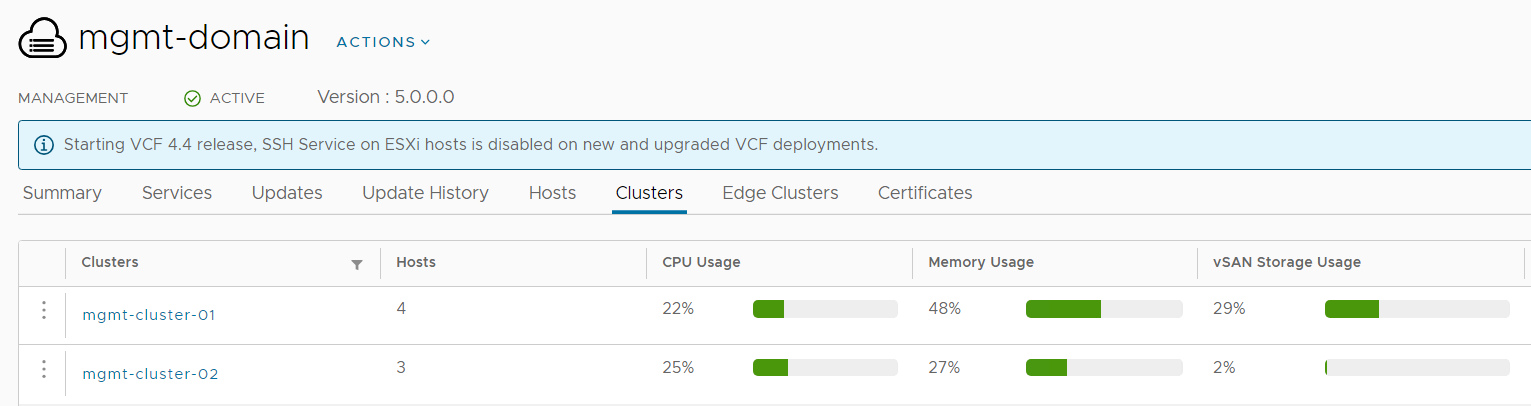
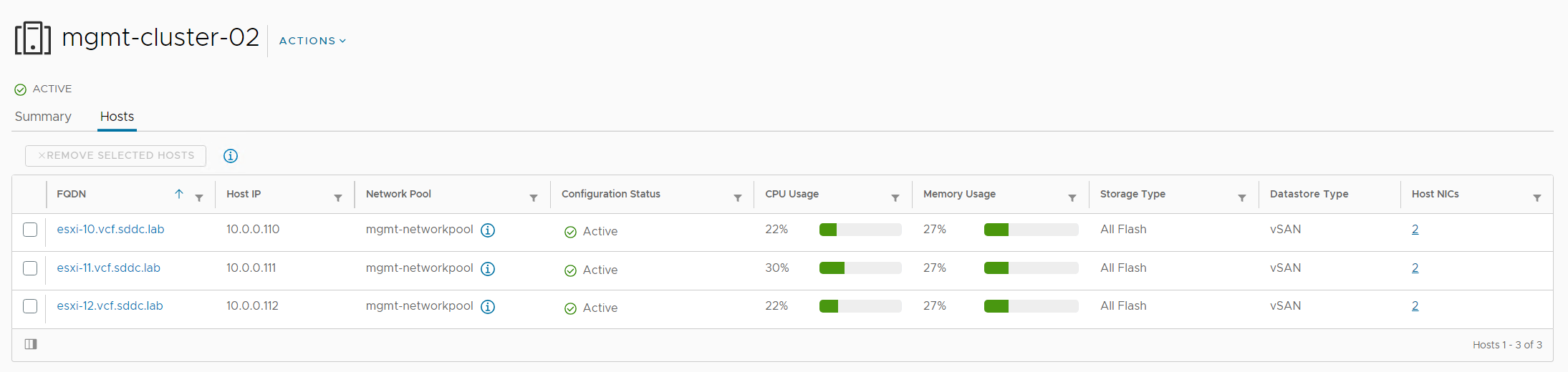
This is the main.tf file used:
terraform {
  required_providers {
    vcf = {
      source  = "vmware/vcf"
    }
  }
}

provider "vcf" {
  sddc_manager_username = var.sddc_manager_username
  sddc_manager_password = var.sddc_manager_password
  sddc_manager_host     = var.sddc_manager_host
}

resource "vcf_host" "host10" {
  fqdn      = var.host_fqdn1
  username  = var.host_ssh_user
  password  = var.host_ssh_pass
  network_pool_id = "f0edf035-b568-48b0-b056-2b4e94c9f01b"
  storage_type = "VSAN"
}

resource "vcf_host" "host11" {
  fqdn      = var.host_fqdn2
  username  = var.host_ssh_user
  password  = var.host_ssh_pass
  network_pool_id = "f0edf035-b568-48b0-b056-2b4e94c9f01b"
  storage_type = "VSAN"
}

resource "vcf_host" "host12" {
  fqdn      = var.host_fqdn3
  username  = var.host_ssh_user
  password  = var.host_ssh_pass
  network_pool_id = "f0edf035-b568-48b0-b056-2b4e94c9f01b"
  storage_type = "VSAN"
}

resource "vcf_cluster" "cluster1" {
  domain_id = var.domain_id
  name = "mgmt-cluster-02"
  host {
    id = vcf_host.host10.id
    license_key = var.esx_license_key
    vmnic {
      id = "vmnic0"
      vds_name = "mgmt-vds02"
    }
    vmnic {
      id = "vmnic1"
      vds_name = "mgmt-vds02"
    }
  }
  host {
    id = vcf_host.host11.id
    license_key = var.esx_license_key
    vmnic {
      id = "vmnic0"
      vds_name = "mgmt-vds02"
    }
    vmnic {
      id = "vmnic1"
      vds_name = "mgmt-vds02"
    }
  }
  host {
    id = vcf_host.host12.id
    license_key = var.esx_license_key
    vmnic {
      id = "vmnic0"
      vds_name = "mgmt-vds02"
    }
    vmnic {
      id = "vmnic1"
      vds_name = "mgmt-vds02"
    }
  }
  vds {
    name = "mgmt-vds02"
    portgroup {
      name = "sddc-vds02-mgmt"
      transport_type = "MANAGEMENT"
    }
    portgroup {
      name = "sddc-vds02-vsan"
      transport_type = "VSAN"
    }
    portgroup {
      name = "sddc-vds02-vmotion"
      transport_type = "VMOTION"
    }
  }
  vsan_datastore {
    datastore_name = "vcf-vsan-02"
    failures_to_tolerate = 1
    license_key = var.vsan_license_key
  }
  geneve_vlan_id = 10
}
This is the variables.tf file:
variable "sddc_manager_username" {
  description = "Username used to authenticate against an SDDC Manager instance"
  default = "administrator@vsphere.local"
}

variable "sddc_manager_password" {
  description = "Password used to authenticate against an SDDC Manager instance"
  default = "VMware123!"
}

variable "sddc_manager_host" {
  description = "FQDN of an SDDC Manager instance"
  default = "sddc-manager.vcf.sddc.lab"
}

variable "domain_id" {
  description = "VCF Workload Domain id"
  default = "c3e2489c-043e-4f8d-b79a-96b35cb05198"
}

variable "esx_license_key" {
  description = "ESXi license key"
  default = "XXXXX-XXXXX-XXXXX-XXXXX-XXXXX"
}

variable "vsan_license_key" {
  description = "vSAN license key"
  default = ""XXXXX-XXXXX-XXXXX-XXXXX-XXXXX"
}

variable "host_fqdn1" {
  description = "FQDN of an ESXi host that is to be commissioned"
  default = "esxi-10.vcf.sddc.lab"
}

variable "host_fqdn2" {
  description = "FQDN of an ESXi host that is to be commissioned"
  default = "esxi-11.vcf.sddc.lab"
}

variable "host_fqdn3" {
  description = "FQDN of an ESXi host that is to be commissioned"
  default = "esxi-12.vcf.sddc.lab"
}

variable "host_ssh_user" {
  description = "SSH user in ESXi host that is to be commissioned"
  default = "root"
}

variable "host_ssh_pass" {
  description = "SSH pass in ESXi host that is to be commissioned"
  default = "VMware123!"
}
Here is the output from Terraform:
C:\Terraform>terraform.exe init


Initializing the backend...


Initializing provider plugins...

- Reusing previous version of vmware/vcf from the dependency lock file

- Using previously-installed vmware/vcf v0.6.0


Terraform has been successfully initialized!


You may now begin working with Terraform. Try running "terraform plan" to see

any changes that are required for your infrastructure. All Terraform commands

should now work.


If you ever set or change modules or backend configuration for Terraform,

rerun this command to reinitialize your working directory. If you forget, other

commands will detect it and remind you to do so if necessary.


C:\Terraform>terraform.exe validate

Success! The configuration is valid.


C:\Terraform>terraform.exe plan


Terraform used the selected providers to generate the following execution plan. Resource actions are indicated with the following symbols:

  + create


Terraform will perform the following actions:


  # vcf_cluster.cluster1 will be created

  + resource "vcf_cluster" "cluster1" {

      + domain_id              = "c3e2489c-043e-4f8d-b79a-96b35cb05198"

      + geneve_vlan_id         = 10

      + id                     = (known after apply)

      + is_default             = (known after apply)

      + is_stretched           = (known after apply)

      + name                   = "mgmt-cluster-02"

      + primary_datastore_name = (known after apply)

      + primary_datastore_type = (known after apply)


      + host {

          + id          = (known after apply)

          + license_key = (sensitive value)


          + vmnic {

              + id       = "vmnic0"

              + vds_name = "mgmt-vds02"

            }

          + vmnic {

              + id       = "vmnic1"

              + vds_name = "mgmt-vds02"

            }

        }

      + host {

          + id          = (known after apply)

          + license_key = (sensitive value)


          + vmnic {

              + id       = "vmnic0"

              + vds_name = "mgmt-vds02"

            }

          + vmnic {

              + id       = "vmnic1"

              + vds_name = "mgmt-vds02"

            }

        }

      + host {

          + id          = (known after apply)

          + license_key = (sensitive value)


          + vmnic {

              + id       = "vmnic0"

              + vds_name = "mgmt-vds02"

            }

          + vmnic {

              + id       = "vmnic1"

              + vds_name = "mgmt-vds02"

            }

        }


      + vds {

          + name = "mgmt-vds02"


          + portgroup {

              + name           = "sddc-vds02-mgmt"

              + transport_type = "MANAGEMENT"

            }

          + portgroup {

              + name           = "sddc-vds02-vsan"

              + transport_type = "VSAN"

            }

          + portgroup {

              + name           = "sddc-vds02-vmotion"

              + transport_type = "VMOTION"

            }

        }


      + vsan_datastore {

          + datastore_name       = "vcf-vsan-02"

          + failures_to_tolerate = 1

          + license_key          = (sensitive value)

        }

    }


  # vcf_host.host10 will be created

  + resource "vcf_host" "host10" {

      + fqdn            = "esxi-10.vcf.sddc.lab"

      + id              = (known after apply)

      + network_pool_id = "f0edf035-b568-48b0-b056-2b4e94c9f01b"

      + password        = (sensitive value)

      + status          = (known after apply)

      + storage_type    = "VSAN"

      + username        = "root"

    }


  # vcf_host.host11 will be created

  + resource "vcf_host" "host11" {

      + fqdn            = "esxi-11.vcf.sddc.lab"

      + id              = (known after apply)

      + network_pool_id = "f0edf035-b568-48b0-b056-2b4e94c9f01b"

      + password        = (sensitive value)

      + status          = (known after apply)

      + storage_type    = "VSAN"

      + username        = "root"

    }


  # vcf_host.host12 will be created

  + resource "vcf_host" "host12" {

      + fqdn            = "esxi-12.vcf.sddc.lab"

      + id              = (known after apply)

      + network_pool_id = "f0edf035-b568-48b0-b056-2b4e94c9f01b"

      + password        = (sensitive value)

      + status          = (known after apply)

      + storage_type    = "VSAN"

      + username        = "root"

    }


Plan: 4 to add, 0 to change, 0 to destroy.


─────────────────────────────────────────────────────────────────────────────────────────────────────────────────────────────────────────────────────────────────────────────────────────────────────────────────────────────────────────────────────────────────────────────────────────


Note: You didn't use the -out option to save this plan, so Terraform can't guarantee to take exactly these actions if you run "terraform apply" now.


C:\Terraform>terraform.exe apply


Terraform used the selected providers to generate the following execution plan. Resource actions are indicated with the following symbols:

  + create


Terraform will perform the following actions:


  # vcf_cluster.cluster1 will be created

  + resource "vcf_cluster" "cluster1" {

      + domain_id              = "c3e2489c-043e-4f8d-b79a-96b35cb05198"

      + geneve_vlan_id         = 10

      + id                     = (known after apply)

      + is_default             = (known after apply)

      + is_stretched           = (known after apply)

      + name                   = "mgmt-cluster-02"

      + primary_datastore_name = (known after apply)

      + primary_datastore_type = (known after apply)


      + host {

          + id          = (known after apply)

          + license_key = (sensitive value)


          + vmnic {

              + id       = "vmnic0"

              + vds_name = "mgmt-vds02"

            }

          + vmnic {

              + id       = "vmnic1"

              + vds_name = "mgmt-vds02"

            }

        }

      + host {

          + id          = (known after apply)

          + license_key = (sensitive value)


          + vmnic {

              + id       = "vmnic0"

              + vds_name = "mgmt-vds02"

            }

          + vmnic {

              + id       = "vmnic1"

              + vds_name = "mgmt-vds02"

            }

        }

      + host {

          + id          = (known after apply)

          + license_key = (sensitive value)


          + vmnic {

              + id       = "vmnic0"

              + vds_name = "mgmt-vds02"

            }

          + vmnic {

              + id       = "vmnic1"

              + vds_name = "mgmt-vds02"

            }

        }


      + vds {

          + name = "mgmt-vds02"


          + portgroup {

              + name           = "sddc-vds02-mgmt"

              + transport_type = "MANAGEMENT"

            }

          + portgroup {

              + name           = "sddc-vds02-vsan"

              + transport_type = "VSAN"

            }

          + portgroup {

              + name           = "sddc-vds02-vmotion"

              + transport_type = "VMOTION"

            }

        }


      + vsan_datastore {

          + datastore_name       = "vcf-vsan-02"

          + failures_to_tolerate = 1

          + license_key          = (sensitive value)

        }

    }


  # vcf_host.host10 will be created

  + resource "vcf_host" "host10" {

      + fqdn            = "esxi-10.vcf.sddc.lab"

      + id              = (known after apply)

      + network_pool_id = "f0edf035-b568-48b0-b056-2b4e94c9f01b"

      + password        = (sensitive value)

      + status          = (known after apply)

      + storage_type    = "VSAN"

      + username        = "root"

    }


  # vcf_host.host11 will be created

  + resource "vcf_host" "host11" {

      + fqdn            = "esxi-11.vcf.sddc.lab"

      + id              = (known after apply)

      + network_pool_id = "f0edf035-b568-48b0-b056-2b4e94c9f01b"

      + password        = (sensitive value)

      + status          = (known after apply)

      + storage_type    = "VSAN"

      + username        = "root"

    }


  # vcf_host.host12 will be created

  + resource "vcf_host" "host12" {

      + fqdn            = "esxi-12.vcf.sddc.lab"

      + id              = (known after apply)

      + network_pool_id = "f0edf035-b568-48b0-b056-2b4e94c9f01b"

      + password        = (sensitive value)

      + status          = (known after apply)

      + storage_type    = "VSAN"

      + username        = "root"

    }


Plan: 4 to add, 0 to change, 0 to destroy.


Do you want to perform these actions?

  Terraform will perform the actions described above.

  Only 'yes' will be accepted to approve.


  Enter a value: yes


vcf_host.host10: Creating...

vcf_host.host12: Creating...

vcf_host.host11: Creating...
 CyberNils.net